Node Graph
The node graph is a visual programming canvas where you wire nodes together to build laser visuals from scratch. Think of it as patching a modular synth, but for lasers.
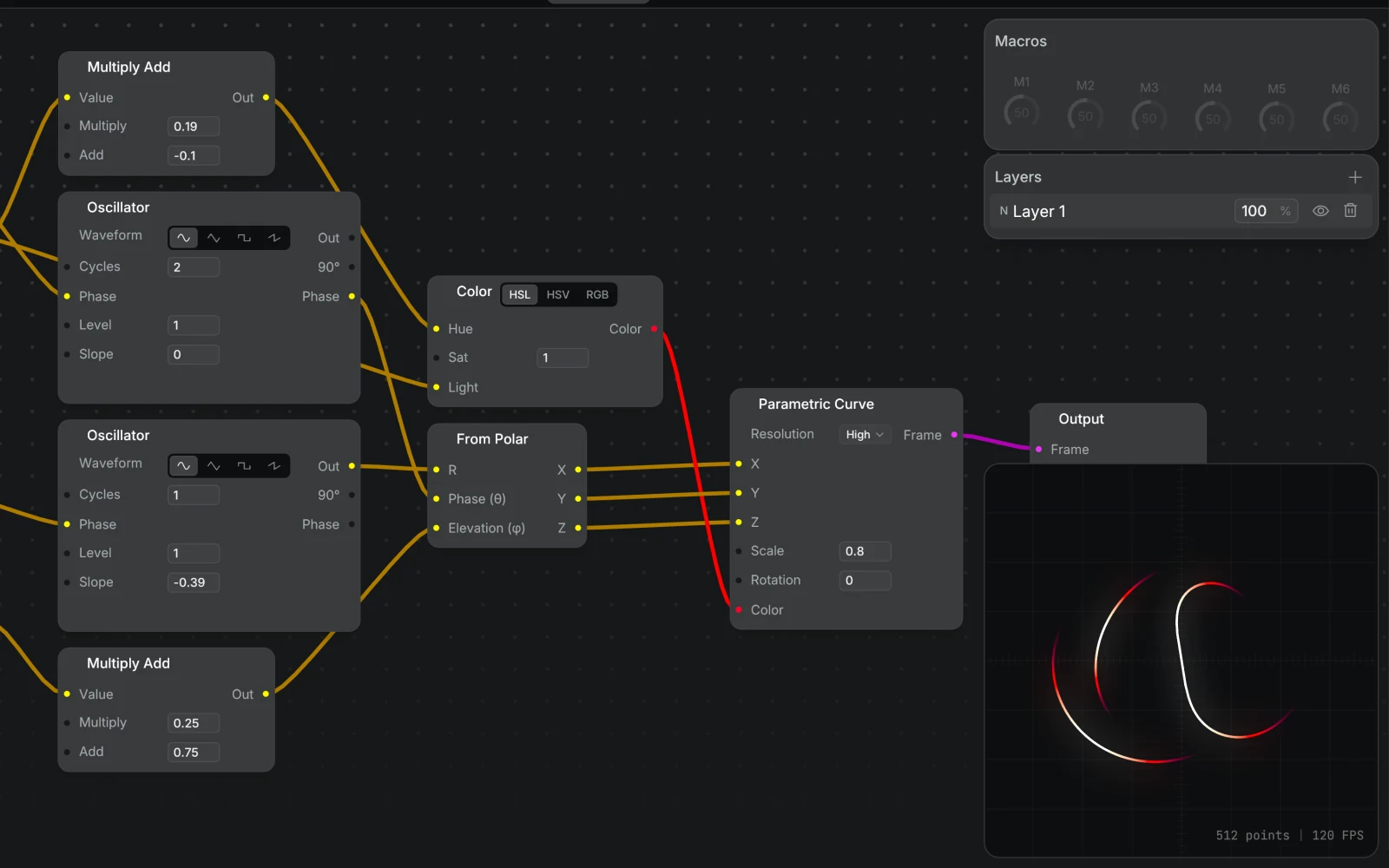
Simple and Node Graph layers are powered by a graph under the hood. Simple layers use preset graphs; the Node Graph layer lets you edit that graph directly.
To start from an existing Simple layer, right-click the layer and choose Extract to Node Graph. That adds a new Node Graph layer next to it, named after the original with "(Graph)" added, with a copy of the preset graph, and hides the original.
Effects use node graphs too. Open an effect's graph editor when you want to change how an output-group effect works or publish custom controls for the effect.
Three Signal Types
Wires carry one of three signals. The editor color-codes them so you always know what's flowing through a wire.
Scalar (yellow): a single value, or a value that varies per point in the frame. Oscillators, noise, math, and channel splitters all produce scalars. Shape generators, Parametric Curve, and Camera Projection sample a scalar at every point, and Colorize evaluates its Color input per point too. That's how an oscillator becomes a waveform shape. Nodes like Duplicator, Dotter, Brightness, and Output read one value per frame.
Frame (pink): a collection of laser points that form paths. Shape generators, file loaders, and video inputs produce frames. Effect nodes like Camera Projection, Colorize, and Duplicator take a frame in and pass a transformed frame out.
Color (red): a packed RGB color, or a per-point color that varies along the frame. The Color node produces one and feeds the Colorize node directly. The To Channels (RGB) node splits a Color back into three scalars when you need to drive other signals from a hue.
You can only connect matching types: yellow to yellow, pink to pink, red to red. When you drag a wire to empty space, the creation menu filters to compatible nodes only.
Building a Patch
Every graph ends at an Output node. Work backwards from there: what shape do you want, how should it move, what color should it be?
A typical patch might look like:
- A shape node (Circle, Polygon, Star, etc.) generates the base geometry.
- A Colorize node applies color, driven by a Color node converting HSL to RGB.
- An Oscillator or Phasor modulates a parameter (scale, rotation, hue) to add motion.
- The Output node positions and scales the final result.
The power is in the wiring. The same oscillator that drives position can also drive color. A single Phasor can rotate a shape, cycle its hue, and phase-offset across multiple lasers, all at once.
Adding and Connecting Nodes
A few ways to add a node:
- Double-click empty space, or right-click it and choose New Node, to open the node creation menu. The new node lands where you clicked. Press
Tabto open the menu with the node landing at the center of the view. - Drag a pin to empty space to open a filtered menu showing only compatible nodes. The wire auto-connects.
- Double-click a wire to insert a new node inline between two connected nodes.
To disconnect a wire, right-click it or Alt-click it. To clear every wire from a pin at once, right-click the pin.
Hover a port row to read its live value in a tooltip beside the node. Connected inputs show the value arriving from upstream, in that port's own units, and outputs show values even on nodes that aren't wired to the Output yet. Frame ports show a live preview of the frame instead, including nodes the Output doesn't reach, like the inactive side of a Frame Switch.
Hover an input's label for a short description of what it does. Right-click the label or value to reset, copy, or paste it, or to link it to a macro under Macros. A wired input can't take a macro, since the wire drives it.
Press N to drop a note at the cursor, ready to type. Notes are free-floating text on the canvas: double-click to edit one, drag its bottom-right corner to re-flow the text, and clear the text to remove it. Notes save with the project, so a patch you share arrives annotated.
Navigating the Graph
Space+ drag pans the view.CmdCtrlCmd/Ctrl+ scroll zooms.
Editing Selections
CmdCtrlCmd/Ctrl + C/CmdCtrlCmd/Ctrl + X/CmdCtrlCmd/Ctrl + V: copy, cut, paste.CmdCtrlCmd/Ctrl + D: duplicate.BackspaceorDelete: delete. The Output node is protected.
See Keyboard Shortcuts for the full list.
Node Reference
Generators
Signal sources that produce values over time or across a frame.
| Node | Description |
|---|---|
| Oscillator | Periodic waveform generator with sine, triangle, square, and saw shapes |
| Phasor | Free-running or BPM-synced ramp from 0 to 1, or a count that keeps rising |
| Noise | Perlin noise generator for organic, non-repeating motion |
| Envelope | Triggered shape with editable keyframes for one-shot animation |
| Sequencer | Step-based pattern that cycles through keyframe values |
| Random | Repeatable random steps from a position signal like BPM Beat Position, or stepped by a trigger |
| Counter | Counts up or down on every beat or trigger, with clamp, loop, or zigzag limits |
| Audio Input | Live audio capture as loudness, spectrum, or waveform |
| DMX Input | Reads one DMX channel over Art-Net or sACN as a normalized signal |
| OSC Input | Reads a numeric OSC argument from any address as a patchable signal |
| MIDI Input | Reads a MIDI CC or note value as a normalized signal |
| Laser Index | Outputs the current laser's index and count for per-laser variation |
| Timecode | Timeline position and elapsed time |
| BPM | Current tempo, beat position, and beat and bar phase ramps from the global BPM clock |
Frame
Nodes that produce, transform, and combine laser frames.
| Node | Description |
|---|---|
| Circle | Ellipse with independent X/Y scale |
| Square | Rectangle with optional rounded corners |
| Polygon | Regular polygon with variable side count |
| Star | Star shape with adjustable point count and depth |
| Wave | Horizontal wave with phase, shape, and cycle controls |
| Rose | Rhodonea curve (rose pattern) with N/D petal ratio |
| Rosette | Rose-like curve with adjustable petals and braid weave |
| Spirograph | Hypotrochoid curve with adjustable outer and inner radii |
| Spiral | Spiral with configurable turns and exponent |
| Waveform Tunnel | Spiral with built-in wave displacement for tunnel effects |
| Line | A single straight line with length, angle, and pivot |
| Spectrum Bars | Bars whose heights follow the Level input. Patch in a Spectrum-mode Audio Input for a spectrum analyzer |
| 3D shapes | Cube, Pyramid, Octahedron, Sphere, and Cylinder. Add Camera Projection to see them in perspective |
| Parametric Curve | Builds a frame from per-point X, Y, Z, and color signals |
| File | Loads ILDA, SVG, or image files as laser frames |
| Video Input | Converts NDI, Syphon, or Spout video to vector laser output |
| Text | Vector text rendering with reveal animation |
| Draw | Hand-drawn paths with the Pencil, Pen, or Line tool |
| Camera Projection | 3D perspective projection with pan, tilt, roll, and translation |
| Duplicator | Copies a frame with progressive rotation, scale, and shift |
| Dotter | Converts paths to evenly-spaced dots with corner detection |
| Trim Path | Keeps the Start to End part of the frame's path. Animate End to draw it out |
| Colorize | Applies a Color signal to a frame with optional endpoint fading |
| Laser Chase | Sequential brightness sweep across multiple lasers |
| Brightness | Uniformly scales the brightness of every point in a frame |
| Merge | Combines two frames into one |
| Frame Switch | Cuts, fades, wipes, or morphs from one frame to another |
| Output | Final node. Scales, positions, and rotates the complete output |
Math
Arithmetic, trigonometry, coordinate conversion, and color construction.
| Node | Description |
|---|---|
| Arithmetic nodes | Add, Subtract, Multiply, Divide, Power, Min, Max, Mod, Clamp, Sin, Cos, Abs, each its own node |
| Multiply Add | Remaps a signal: output = value x multiply + add |
| Scalar Switch | Picks A below 0.5, otherwise B |
| Mix | Linear blend between two scalars: A + t × (B − A) |
| Map Range | Remaps a value from one range to another, with clamp, loop, and zigzag options |
| From Polar | Converts radius, angle, and elevation to X/Y/Z coordinates |
| To Polar | Converts X/Y/Z coordinates to radius, angle, and elevation |
| Color | Builds a Color signal from HSL, HSV, or RGB |
| To Channels (RGB) | Splits a Color signal back into R, G, B scalars |