OSC
Modulaser supports Open Sound Control (OSC) input and output over UDP. You can map any OSC address to any parameter (clip controls, output settings, BPM, cues, timecode) and get value feedback sent back to your controller.
OSC shares the same control infrastructure as MIDI, so the learn flow and mapping targets work the same way. If you run a lighting desk, see DMX for fixed-fixture control over Art-Net or sACN.
Enabling OSC
Open Settings, choose the OSC tab, and tick Enable OSC. Set the Input port Modulaser listens on (default 8000). To get parameter values back on your controller, set Output host and Output port to its IP address and listening port (default 127.0.0.1:9000). Feedback, query replies, and /info responses all go there.
The tab also has a message log that shows what arrived and whether Modulaser handled it, which is the quickest way to debug a wrong address.
When OSC is enabled, Modulaser advertises itself on the local network via mDNS (_osc._udp). Controllers that support ZeroConf/Bonjour (TouchOSC, Lemur, Max/MSP) can discover Modulaser automatically without manual IP/port entry.
Starter Templates
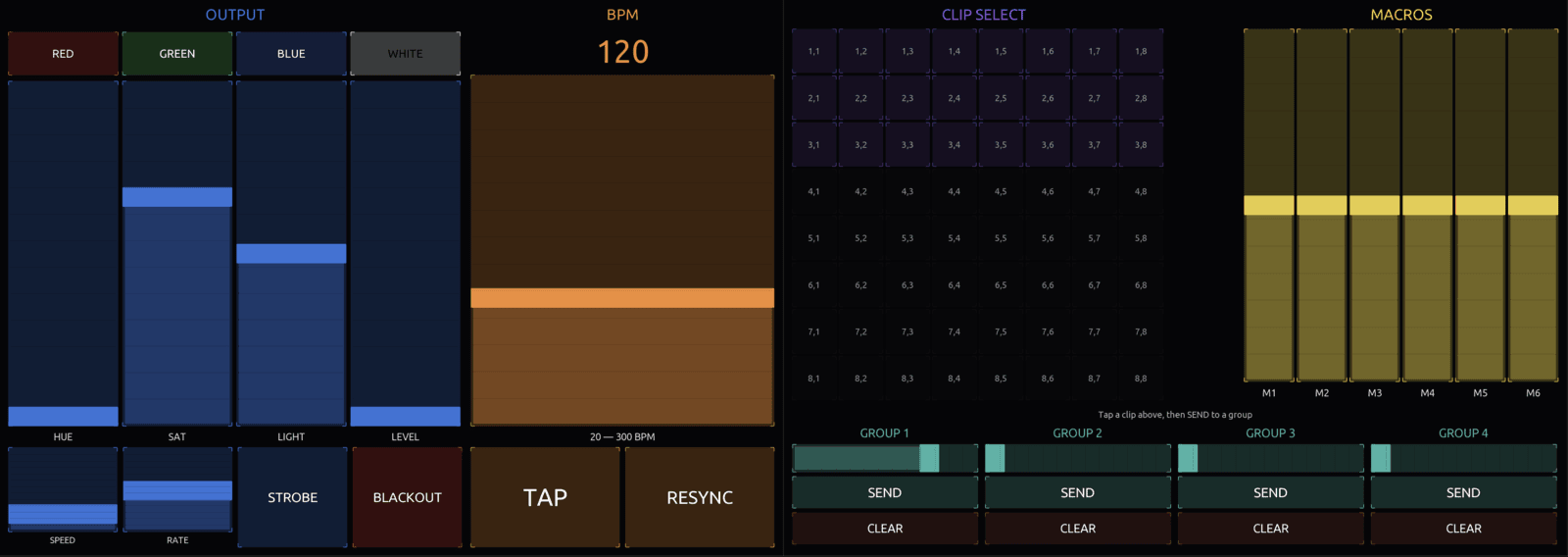
Modulaser ships with ready-to-use control surface layouts for both TouchOSC and Open Stage Control. Both share a four-page layout, pre-wired to the default address scheme:
- Master: color presets and RGB faders, strobe rate, colorize and strobe toggles, blackout, speed, BPM with live readout, tap, resync. Color and strobe drive the selected output group's Colorize and Strobe effects
- Cue: play/pause, prev/next, stop, loop, and an 8×4 jump-to-cue grid (32 cues)
- Timecode: play/pause, skip back/forward, stop, seek
- Clips: 8×8 clip-select grid with feedback, 6 macro faders, and 4 output-group strips with opacity, send, and clear
Both templates request a state refresh when they load, so widgets start on Modulaser's current values instead of the template defaults.
Downloads:
OSC Learn
OSC learn works just like MIDI learn. Open it from the menu:
- macOS: menu bar > Shortcuts > Edit OSC…
- Windows / Linux: Edit > OSC Learn
All mappable controls show a green overlay.
- Click a control in Modulaser to select it as the target
- Send an OSC message from your controller
- The mapping is created and saved automatically
The learn window shows the assigned address, or the default address if you haven't mapped one, and a Range for continuous parameters. Click Clear to remove a mapping. For output group and layer targets, switch Scope between a fixed index (This Group, This Layer) and one that follows your selection (Selected Group, Selected Layer).
Effect sync rates and colors can also get recall pads: buttons that jump straight to one value. In learn mode, click an effect's sync-rate dropdown, click a rate in the list that opens, then send a message from a button. For a color control like Colorize's, click it to open the picker, click a palette swatch, then send. A pad sends 1 back while the control holds its value and 0 otherwise, so the button lights up on the active rate or color.
Only one learn mode can be active at a time. Enabling OSC learn disables MIDI learn and vice versa.
Default Addresses
Modulaser has a built-in address scheme that works without any manual mapping. Addresses are case-insensitive.
Clip Parameters
Clip addresses target the currently selected clip and layer. The general pattern is /clip/{category}/{parameter}. Macros are the exception: they're clip-level and work without a layer selection.
| Pattern | Example | What it controls |
|---|---|---|
/clip/{axis}/{param} | /clip/x/cycles | X, Y, or Z oscillator |
/clip/color/{param} | /clip/color/hue | Color (hue, saturation, lightness, value, override) |
/clip/transform/{param} | /clip/transform/rotation | Transform (scale, shift, rotation) |
/clip/duplicator/{param} | /clip/duplicator/amount | Duplicator |
/clip/camera/{param} | /clip/camera/pan | Camera |
/clip/file/{param} | /clip/file/speed | ILDA file playback |
/clip/shape/{param} | /clip/shape/size | Shape generator |
/clip/dotter/{param} | /clip/dotter/count | Dotter |
/clip/text/{param} | /clip/text/spacing | Text |
/clip/mask/{param} | /clip/mask/radius | Mask layer |
/clip/draw/{param} | /clip/draw/progress | Draw layer |
/clip/{type}/{pos}/{param} | /clip/osc/1/cycles | Modulators (osc, audio, env, seq) |
/clip/noise/{index}/{param} | /clip/noise/1/detail | Noise modulators |
/clip/{axis}phasor/{param} | /clip/xphasor/offset | Phasors (x, y, z, dotter, shape) |
/clip/macro/{1-6} | /clip/macro/1 | Macro links |
/clip/layer/{index}/{param} | /clip/layer/0/opacity | Layer (select, opacity, visible) |
/clip/select/{row}/{col} | /clip/select/0/2 | Clip selection |
/clip/select/{row}/{col}/group/{index} | /clip/select/0/2/group/0 | Select a clip and send it to an output group |
Available Parameters
| Category | Parameters |
|---|---|
| Oscillator (x/y/z) | cycles, speed, level, phase, exponent, pulsewidth, spread, bpmsync |
| Color | hue, saturation, lightness, value, override |
| Transform | scalex, scaley, shiftx, shifty, rotation |
| Duplicator | amount, rotation, scale, shiftx, shifty |
| Camera | translatex, translatey, translatez, pan, tilt, roll |
| File/ILDA | speed |
| Modulator (osc/audio/env/seq) | cycles, speed, level, phase, exponent, pulsewidth, spread, hit, duration, detail, bpmsync, synclasers, bipolar |
| Noise | detail, speed, level, synclasers |
| Shape | size, scalex, scaley, cycles, waveshape, phase, speed, sides, points, depth, depth3d, segments, petals, loops, turns, exponent, cornerradius, angle, barlevel, bars, notch, innerradius, mirror, circular, bpmsync |
| Dotter | count, phase, pathmix, cornerthreshold, offsetspeed, cornermode, inherit, enabled, bpmsync |
| Text | scalex, scaley, spacing, trim |
| Mask | centerx, centery, radius, radiusx, radiusy, halfwidth, halfheight, rotation, corner, feather |
| Draw | progress, trail, tailfade, explode |
| Phasor | offset, speed, spread, bpmsync |
| Layer | select, opacity, visible |
Global Output
| Address | Target |
|---|---|
/output/blackout | Blackout toggle |
/output/speed | Speed multiplier |
Global color and strobe now live in per-output-group effect chains instead of /output/color/* and /output/strobe/*. Route color and strobe through the group effect addresses below.
Output Groups
| Pattern | Target |
|---|---|
/group/{index}/opacity | Group opacity (0-based) |
/group/{index}/send | Send selected clip to group |
/group/{index}/clear | Clear group |
/group/{index}/select | Select group |
/group/{index}/select_clip | Select clip within group |
/group/selected/{param} | Same targets, but for the focused group |
/group/{index}/name and /group/selected/name send the group name back as a string, and /group/selected/index sends the focused group's index (-1 when nothing is focused). These are feedback only.
Output Group Effects
Effect chains are scoped to output groups. Slots are zero-based, and preset addresses target the first matching effect in the chain. The chain itself (adding, removing, reordering) isn't exposed over OSC, and a slot address only works while an effect sits in that slot.
| Pattern | Target |
|---|---|
/group/{index}/fx/{slot}/enabled | Enable effect slot |
/group/{index}/fx/{slot}/{key} | Control effect slot parameter |
/group/selected/fx/{slot}/{key} | Control selected group effect slot |
/group/{index}/fx/{preset_short}/{key} | Control the first matching preset in a group |
/group/selected/fx/{preset_short}/{key} | Control the first matching preset in the selected group |
Built-in preset short names are colorize, strobe, chase, scale_pulse, flash, and rotation. Control keys come from the effect's published controls, for example /group/0/fx/strobe/rate. Send /info/group to list every key in the current chains.
Color controls take one channel at a time: /group/0/fx/colorize/color/r, /g, and /b, each 0–1. Sync rates (the rate of Chase, Scale Pulse, Flash, and Rotation) take 0–1 and step through the 11 rates from bpm/32 to 8×bpm.
See Effects for how to add effects and publish controls.
BPM
| Address | Target |
|---|---|
/bpm/value | Set BPM. Accepts the actual BPM number (20–300), not a normalized value |
/bpm/tap | Tap tempo |
/bpm/resync | Resync beat phase |
Cue List
| Address | Target |
|---|---|
/cue/playpause | Play (above 0.5) or pause |
/cue/stop | Stop |
/cue/next | Next cue |
/cue/previous | Previous cue |
/cue/loop | Loop on (above 0.5) or off |
/cue/{index}/goto | Jump to cue by index |
/cue/playpause, /cue/loop, and /timecode/playpause follow the value you send: above 0.5 turns them on (or plays), anything else turns them off (or pauses). Use a latching button, not a momentary one.
Timecode
| Address | Target |
|---|---|
/timecode/playpause | Play (above 0.5) or pause |
/timecode/stop | Stop |
/timecode/seek | Seek (0.0–1.0 of duration) |
/timecode/skipback | Skip back 1 frame |
/timecode/skipforward | Skip forward 1 frame |
/timecode/skipback/{N}s|m|h | Skip back N seconds, minutes, or hours (e.g. /timecode/skipback/10s) |
/timecode/skipforward/{N}s|m|h | Skip forward N seconds, minutes, or hours |
/timecode/loopclip | Toggle Loop clip for the clip you opened from the timeline |
/timecode/mute | Toggle the timeline audio track's mute |
State Refresh
| Address | Target |
|---|---|
/refresh | Push the full current state to the configured output |
/sync | Alias of /refresh |
Send a zero-argument message (or any value) to /refresh when an OSC client connects after Modulaser already has OSC enabled. This re-sends every parameter value so widgets jump from their template defaults to Modulaser's actual state.
Address Aliases
Many addresses have short aliases that resolve to the same target:
| Full name | Alias |
|---|---|
saturation | sat |
lightness | light |
rotation | rot |
exponent | exp |
pulsewidth | pw |
translatex/y/z | tx, ty, tz |
playpause | play |
previous | prev |
skipback | back |
skipforward | forward |
osc (modulator) | lfo |
env (modulator) | envelope |
seq (modulator) | sequencer |
speed | speedhz (oscillator, shape, phasor, noise) |
offsetspeed (dotter) | speedhz |
value (color level) | val |
file (prefix) | ilda |
Oscillator and phasor speed send their feedback on speedhz, so use that address if a widget needs the value back.
Custom Mappings
Custom mappings let you override or extend the default address scheme. A mapping connects an OSC address to a control target with an optional input range. To read an address without a mapping, use the OSC Input node.
When both a custom mapping and a default address match an incoming message, the custom mapping takes priority.
Wildcards
OSC Learn always creates a mapping for the exact address it received. To use wildcards, edit the mapping's address in osc-mappings.json. Custom addresses support two wildcard patterns:
*matches a single path segment./clip/*/levelmatches/clip/x/leveland/clip/y/level**matches zero or more segments./group/**/opacitymatches/group/0/opacityand/group/selected/opacity
When multiple mappings match, the most specific one wins (counted by literal segments).
Input Range
By default, Modulaser expects incoming values in the 0.0–1.0 range. The Range fields in the learn window narrow that range (for example 0.2 to 0.8) or invert it (1.0 to 0.0) to reverse the control direction.
If your controller sends another range, like degrees (0–360) or MIDI-style (0–127), scale it in the controller, or read the address with an OSC Input node followed by a Multiply Add node. You can also edit the mapping's range in osc-mappings.json.
Modulaser reads the first numeric argument in a message and takes it as an absolute value. String arguments are ignored, including the relative + / - adjustments some apps send.
Feedback
When OSC output is enabled, Modulaser sends parameter values back to your controller whenever they change, on default and custom addresses alike. Effect controls are the exception: they only push feedback to custom mapping addresses, while their default /group/…/fx/… addresses still answer queries. Feedback is suppressed for 50ms after receiving a message on a given address to prevent loops.
The full current state is sent when OSC is first enabled. Clients that connect later can request the same push by sending to /refresh.
Wildcard Feedback
Custom mappings with wildcard addresses (e.g., /clip/*/cycles) track which concrete addresses have been received. Feedback is sent to those resolved addresses. Until a concrete address is seen, feedback falls back to the default address for the target.
Feedback Values
Most parameters send a value between 0.0 and 1.0. Clip selection is three-state:
1.0: selected0.5: occupied but not selected0.0: empty
Output group send and clear buttons are two-state: 1.0 when the group has a clip routed to it, 0.0 when it's empty.
Querying Parameters
Send a zero-argument message to any mapped address and Modulaser responds with the current value. This is useful for syncing a controller on connect or building custom status displays.
Queries always get a response, even if feedback suppression is active for that address. Action-only targets like /bpm/tap produce no query response.
Discovering Addresses
Send a zero-argument message to /info and Modulaser responds with a bundle listing every available address. Each entry contains five arguments: [address, kind, min, max, current_value]. Kind is one of continuous, toggle, or action. Action entries send NaN for the current value.
Responses are chunked into bundles of 12 messages to stay within UDP packet size limits.
You can scope the query to a specific category:
| Address | Returns |
|---|---|
/info | Everything |
/info/clip | Clip parameters |
/info/output | Global output |
/info/group | Output groups |
/info/bpm | BPM |
/info/cue | Cue list |
/info/timecode | Timecode |